
boards
Every board in config.yml, what it reads, how it measures progress, and each option you can set on one. Read this one first if you only read one config page.
The boards block is the heart of the plugin. Every leaderboard you see in
the GUI is one entry in this block. This is the page to read if you only
read one configuration page.
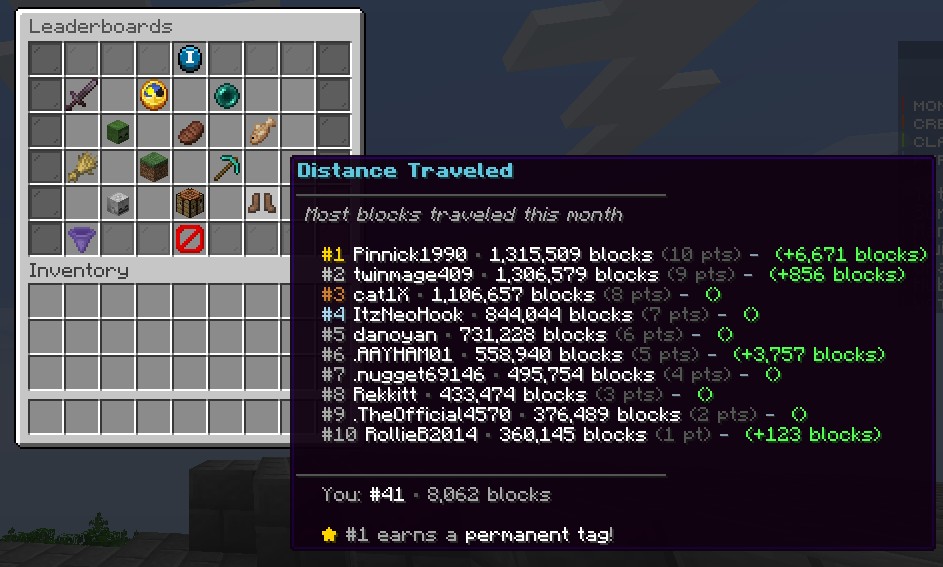
The main GUI, showing a distance board with this period's progress and the change since the last refresh.
Quick example
This is the bundled playtime board, exactly as it ships:
boards:
  playtime:
    enabled: true
    display-name: "<#F0B060><bold>Playtime</bold>"
    description: "Most hours logged this month"
    material: CLOCK
    type: STATISTIC
    statistic: PLAY_ONE_MINUTE
    tracking: DELTA
    value-format: "TIME"
    gui-slot: 12
    category: social
Add a board like that, run /lbadmin reload, and it shows up in the GUI.
The key you give it (playtime here) is the board id. You use that id in
commands, placeholders and the per-board rewards block.
Two settings decide what a board tracks
type says where the number comes from. tracking says how progress
is measured over a period. They are separate settings, and a board needs
both.
Board types
| Type | What it reads |
|---|---|
STATISTIC | A built-in Minecraft statistic. Set which one with statistic. |
VAULT_BALANCE | The player's economy balance. Needs Vault and an economy plugin. |
PLACEHOLDER | Any PlaceholderAPI placeholder that returns a number. Set it with placeholder. |
CUSTOM_ORES | Ores mined. The ore list is under custom-tracking.ores. |
CUSTOM_CROPS | Crops harvested. The crop list is under custom-tracking.crops. |
CUSTOM_BLOCKS | Blocks placed. |
CUSTOM_BLOCKS_BROKEN | Blocks broken. Blocks the player placed first do not count. |
CUSTOM_WOOD | Natural logs chopped: any log, stem or stripped log. |
CUSTOM_ITEMS_CRAFTED | Items crafted. |
CUSTOM_ITEMS_BROKEN | Tools and armour broken. |
CUSTOM_DISTANCE | Distance traveled in blocks. Horizontal movement only, falling does not count. |
CUSTOM_MOB_KILLS | Mob kills. Can leave out spawner mobs. |
CUSTOM_PLAYER_KILLS | PvP kills, with a cooldown against farming the same player. |
CUSTOM_DAMAGE_DEALT | Damage dealt. Can leave out spawner mobs. Use this instead of STATISTIC with DAMAGE_DEALT, which counts mob grinders. |
CUSTOM_POTIONS_BREWED | Bottles brewed, credited to whoever used the brewing stand last. |
CUSTOM_TAMED | Animals tamed. |
CUSTOM_QUESTS | Quests completed on the AxQuestBoard board. Needs the AxQuestBoard plugin, and counts from the moment the board is set up. |
CUSTOM_COUNTER | Nothing on its own. It only moves when a command adds to it, see Feeding a board from another plugin. |
CUSTOM_DAMAGE_DEALT and CUSTOM_QUESTS arrived in v1.9.16.
CUSTOM_BLOCKS_BROKEN, CUSTOM_WOOD, CUSTOM_POTIONS_BREWED,
CUSTOM_TAMED and CUSTOM_COUNTER arrived in v1.9.17.
A STATISTIC board only works with statistics that stand on their own,
such as PLAY_ONE_MINUTE, FISH_CAUGHT, ANIMALS_BRED or DEATHS.
Statistics that need a block, item or entity to go with them
(MINE_BLOCK, KILL_ENTITY, CRAFT_ITEM and so on) are not supported.
Use the matching CUSTOM_ type instead.
Tracking modes
| Mode | What it measures | Use it with |
|---|---|---|
DELTA | The change since the period started. This is the default. | STATISTIC, VAULT_BALANCE, PLACEHOLDER |
CURRENT | The live value, whatever it is right now. It never resets. | VAULT_BALANCE, PLACEHOLDER |
ACCUMULATE | A count the plugin keeps itself by watching events. | Every CUSTOM_ type, and only those |
Pick DELTA for a "most money earned this month" board and CURRENT for
an "all-time richest" board. With CURRENT the same players lead every
period, because nothing resets. ACCUMULATE only works with the
CUSTOM_ types. On any other type the board stays empty.
Reference
| Key | Type | Default | Notes |
|---|---|---|---|
enabled | boolean | true | A disabled board does not show in the GUI and is not ranked. |
display-name | string | the board id | Name shown in the GUI. Supports MiniMessage colors. |
description | string | empty | Short line shown under the name in the tooltip. |
material | string | PAPER | Icon in the GUI. Any Bukkit material name. An invalid name stops the board from loading. |
custom-model-data | integer | 0 | For resource packs. |
type | string | STATISTIC | One of the board types. |
tracking | string | DELTA | One of the tracking modes. |
statistic | string | none | Required when type is STATISTIC. A Bukkit Statistic name. |
placeholder | string | none | Required when type is PLACEHOLDER. The placeholder must return a number. |
value-format | string | %value% | How the number is shown. %value% is the number. TIME turns ticks into days, hours and minutes. |
gui-slot | integer | 0 | Slot in the main GUI, 0 to 53, top left is 0. |
category | string | misc | Tab the board sits under when category tabs are on: combat, economy, gathering, social or misc. |
sound | string | none | Sound played when a player clicks the board, for example UI_TOAST_IN or ENTITY_EXPERIENCE_ORB_PICKUP. |
points-multiplier | integer | 1 | Multiplies the points this board gives. Set 2 for a double points event on one board. |
hide-attributes | boolean | false | Hides the vanilla tooltip lines on the icon. Useful for swords, tools and armour. |
hidden | boolean | false | See Hidden boards. |
Feeding a board from another plugin
A CUSTOM_COUNTER board never moves on its own. It counts whatever you
tell it to, through one command:
/lbadmin addstat <player> <board-id> <amount>Put that in another plugin's reward commands and that plugin now feeds a leaderboard. An event plugin can credit a win like this:
boards:
  events-won:
    enabled: true
    display-name: "<#FFD93D><bold>Events Won</bold>"
    description: "Most events won this month"
    material: NETHER_STAR
    type: CUSTOM_COUNTER
    tracking: ACCUMULATE
    value-format: "%value% wins"
    gui-slot: 40
    category: misc
lbadmin addstat {player} events-won 1addstat works on any board the plugin counts itself, so every
ACCUMULATE board, not only CUSTOM_COUNTER. It refuses a board that
reads a live value. It needs the tdxleaderboards.admin.setstat
permission, the same one as setstat.
The amount shows on the board at the next refresh. The player can be offline as long as they have joined before: the amount is saved straight away, but a board only recalculates players who are online, so theirs appears the next time they are on the server for a refresh.
Hidden boards
Set hidden: true on a board that should only feed placeholders, for
example a hologram at spawn. A hidden board has no tile in the GUI, gives
no points or rewards, and is never announced.
boards:
  holo-balance:
    enabled: true
    hidden: true
    display-name: "Richest"
    type: VAULT_BALANCE
    tracking: CURRENT
    value-format: "$%value%"
Read it with %tdxleaderboards_board_<id>_name_<1-10>% and
%tdxleaderboards_board_<id>_value_<1-10>%. With tracking: CURRENT it
shows the live value of everybody who has logged in since the last reset,
so inactive players fall off on their own.
Settings for the plugin-counted types
These live in the custom-tracking block, outside boards.
| Key | Type | Default | Notes |
|---|---|---|---|
custom-tracking.mob-kills.exclude-spawner-kills | boolean | true | Spawner mobs do not count toward CUSTOM_MOB_KILLS. |
custom-tracking.damage-dealt.exclude-spawner-mobs | boolean | true | Damage to spawner mobs does not count, vanilla or RoseStacker. Keeps mob grinders off the board. |
custom-tracking.damage-dealt.count-player-damage | boolean | true | Set false to make the damage board about mobs only. |
custom-tracking.blocks-broken.placed-block-memory | integer | 100000 | How many recently placed blocks to remember, so breaking your own block does not count. 100000 costs about 10 MB of memory. 0 turns it off. |
custom-tracking.blocks-broken.ignore-instant-breaks | boolean | true | Leaves out grass, flowers, torches and crops. |
custom-tracking.player-kills.anti-farming-cooldown | integer | 300 | Seconds before killing the same player counts again. |
custom-tracking.ores | list | 19 ores | Materials that count as an ore for CUSTOM_ORES. |
custom-tracking.crops | list | 14 crops | Materials that count as a crop for CUSTOM_CROPS. |
Damage is counted on the same scale as the vanilla statistic, 10 per heart, and only for health actually taken off the target. Overkill does not count.
Rewards for one board
Points rewards pay out from the overall points leaderboard. To also reward
the top players of a single board, add it under rewards.board-rewards
using the board id:
rewards:
  board-rewards:
    ores-mined:
      1:
        commands:
          - "give %player% diamond_pickaxe 1"
        message: "<#4DA6E8>Top miner! Enjoy a diamond pickaxe."
      2:
        commands:
          - "give %player% diamond 3"
        message: "<#4DA6E8>2nd place miner! Here's 3 diamonds."
A winner who is offline when the period resets gets their commands the next time they join.
See also
- Commands for
/lbadmin addstatandsetstat - Placeholders for the full placeholder list
- Add a custom board