
boards
The actual board definitions, type, statistic, material, slot. Read this one first if you only read one config page.
The boards block is the heart of the plugin. Every leaderboard you see in
the GUI is one entry in this block. This is the page to read if you only
read one configuration page.
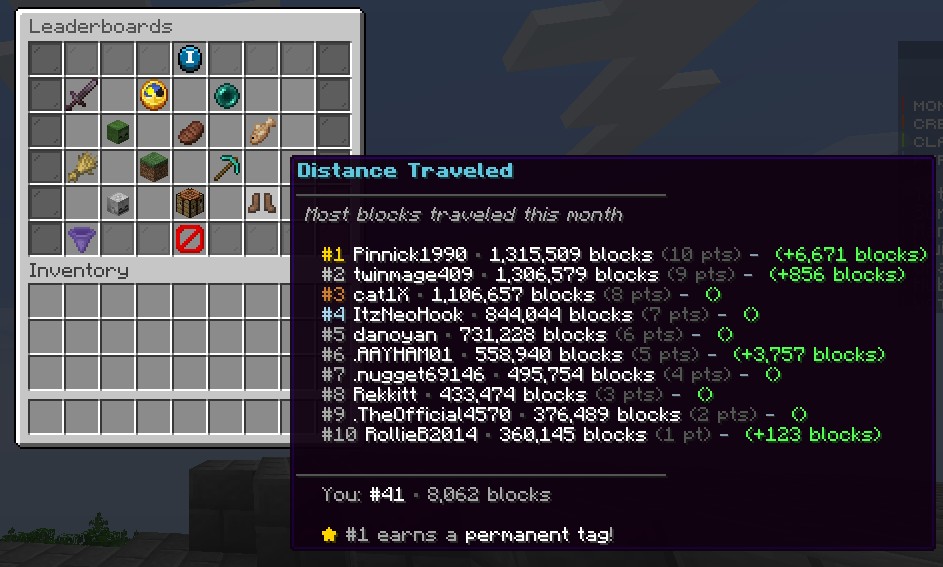
A DELTA board (distance_walked) showing this month's progress and
the delta since the last refresh.
What a board looks like
The smallest valid board is four lines of YAML:
boards:
  votes:
    enabled: true
    title: "Top Voters"
    type: ACCUMULATE
    statistic: VOTE
    material: PAPER
    slot: 11
Drop that into your config.yml, run /lbadmin reload, and you have a
working votes board. Everything else on this page is options on top of
that minimum.
Anatomy of a board
boards:
  <board-key>:                  # internal key, must be unique, no spaces
    enabled: true               # master switch for this board
    title: "Display Title"      # name shown in the GUI and in messages
    description: "..."          # optional, shown as the first lore line
    type: DELTA                 # DELTA | CURRENT | ACCUMULATE
    statistic: MOB_KILLS        # what to count, see "statistic kinds" below
    material: DIAMOND_SWORD     # icon shown in the main GUI
    slot: 22                    # slot index in the main GUI (0..53)
    category: combat            # tab grouping in the GUI filter
    glow-when-first: true       # enchant-glow if the viewer is #1
    enabled-rewards: true       # whether the global rewards block applies
    custom-points:              # optional points override for this board only
      1: 25
      2: 20
      3: 15
Tracking modes
A board's type determines how its values are counted. Pick the right one
or your board will silently track the wrong thing.
| Type | Resets at period? | What it tracks | Use it for… |
|---|---|---|---|
DELTA | Yes | Difference between the value at start of period and now | Monthly stat boards: kills, distance, blocks |
CURRENT | No | The current live value, recomputed every refresh | Vault balance, "current play time", PAPI value |
ACCUMULATE | Yes | A counter the plugin increments on its own events | Votes, custom counted events, plugin hooks |
DELTA and ACCUMULATE reset at the end of every period, CURRENT
does not. A "richest player this month" board should be DELTA against
a balance statistic, not CURRENT (which would always show the
all-time-richest player, regardless of the month).
Statistic kinds
The statistic field is how you tell the plugin what to count. There are
four families:
Use any Bukkit Statistic
name. The most useful ones:
boards:
  mob_kills:
    type: DELTA
    statistic: MOB_KILLS
    material: DIAMOND_SWORD
    slot: 11

  distance_walked:
    type: DELTA
    statistic: WALK_ONE_CM
    material: LEATHER_BOOTS
    slot: 12

  blocks_mined:
    type: DELTA
    statistic: MINE_BLOCK         # this one needs a sub-key, see below
    statistic-target: STONE
    material: STONE_PICKAXE
    slot: 13
For statistics that take a target (MINE_BLOCK, KILL_ENTITY, etc.) add
a statistic-target: line with the material or entity type.
Requires Vault. The plugin reads the player's balance through the Vault abstraction so it works with any economy plugin (EssentialsX, CMI, TheNewEconomy, etc).
boards:
  richest:
    type: CURRENT          # use CURRENT for live balance
    statistic: VAULT_BALANCE
    material: GOLD_INGOT
    slot: 14
    title: "Richest"

  earned_this_month:
    type: DELTA            # or DELTA for "earned this period"
    statistic: VAULT_BALANCE
    material: EMERALD
    slot: 15
    title: "Top Earners (Month)"
Reads any PAPI placeholder as a number. Requires PlaceholderAPI installed.
boards:
  jobs_level:
    type: CURRENT
    statistic: PLACEHOLDER
    statistic-target: "%jobs_total_level%"
    material: NETHERITE_PICKAXE
    slot: 16
    title: "Top Jobs Level"
The plugin parses the placeholder result as an integer (or double, then truncates). If a player's placeholder returns non-numeric text, they're silently skipped on that refresh.
The ACCUMULATE type lets the plugin count events itself. Use it for
plugin-specific counters like votes, kills with a specific weapon, etc.
boards:
  votes:
    type: ACCUMULATE
    statistic: VOTE             # this is a custom counter key
    material: PAPER
    slot: 11
    title: "Top Voters"
The list of custom counter keys is:
| Key | Incremented when |
|---|---|
VOTE | A vote arrives via the bundled Votifier listener |
BREAK | A block break event fires for a configured material |
PLACE | A block place event fires for a configured material |
CRAFT | A craft event fires for a configured item |
PICKUP | A pickup event fires for a configured item |
The configured-material list lives in the
custom-tracking block.
Worked example: a "monthly money earned" board
You want a board called Top Earners that tracks how much money each player has earned this month, sorted high to low, with custom rewards.
boards:
  top_earners:
    enabled: true
    title: "Top Earners (Month)"
    description: "Most money earned this month"
    type: DELTA                 # earned-this-period, not all-time
    statistic: VAULT_BALANCE
    material: EMERALD
    slot: 15
    category: economy
glow-when-first: truerewards:
per-board:
top_earners:
1:
commands:
- "eco give %player% 50000"
- "lp user %player% parent add tycoon"
message: "<#FFD700>Top Earner of the month! +$50k bonus and the Tycoon tag.</>"
2:
commands:
- "eco give %player% 25000"
message: "<#C0C0C0>2nd richest! +$25k bonus.</>"
3:
commands:
- "eco give %player% 10000"
message: "<#CD7F32>3rd richest! +$10k bonus.</>"/lbadmin reload
/lbadmin update
/leaderboardThe new board appears in the GUI in slot 15 with an emerald icon, sitting in the Economy category. At the next monthly reset, the top three earners receive their bonuses automatically.
Need a board the plugin doesn't natively support? Open a feature request in the TDX Discord, most "I want a board for X" requests are an hour of work to add as a built-in.